Food Date Labelling for Commercial Kitchens
If you walk into a busy kitchen at 6am and look in the walk-in, you can tell a lot about the business from the labels. Neat, readable, consistent labels mean someone has a system. Biro on masking tape, half of it smudged, usually means the system is one very tired person's memory.
Date labelling is one of the most routine jobs in a commercial kitchen, and one of the first things an inspector or auditor looks at. This guide covers what a good label needs, where handwritten labelling goes wrong, and what to look for if you are choosing a label printer or labelling system.
What a food date label is for
A date label answers three questions for anyone who opens the fridge: what is this, when was it made or opened, and when must it be used or thrown out.
That sounds simple, but it is the control that stops out-of-date food reaching a plate. It also gives you a record that your shelf-life rules are actually being followed, which is what auditors want to see.
What should be on a prep label
The exact requirements depend on your country and on whether the food is prepared in-house for use in the same kitchen or packed to be sold. For internal prep and storage, most kitchens put the following on every label:
- Product name. What it is, in words everyone on the team recognises.
- Date and time prepared or opened.
- Use-by or discard date. Calculated from your own shelf-life rules, not guessed.
- Allergens. Any of the major allergens the item contains.
- Who prepared it. Initials or a staff ID, so there is accountability.
- Storage instruction. For example keep chilled, or keep frozen.
If you sell food that is packed on the premises before the customer orders it, extra rules apply, including a full ingredient list with allergens emphasised. In the UK this is called prepacked for direct sale, or PPDS. Check the rules for your own country, and see our Food Labelling Requirements guide for the UK detail.
Where handwritten labels go wrong
Handwritten labelling is not illegal, and plenty of kitchens do it well. The problems are practical:
- Legibility. Condensation, cold and speed make handwriting unreadable.
- Calculation errors. Someone works out the use-by date in their head at the end of a long shift.
- Missing information. Allergens and initials get left off when the team is rushed.
- No record. A label on a tub tells you about that tub. It tells you nothing about last Tuesday.
- Time. Writing out the same label hundreds of times a week adds up to hours of paid time.
None of these is anyone's fault. They are what happens when a repetitive job depends on people being at their best every time.
What automated date labelling does differently
An automated labelling system prints the label for you from a stored list of products. In practice that means:
- The product name, allergens and shelf life are set up once.
- A team member picks the item and the label prints with the correct date, time and use-by already worked out.
- Every label printed is logged, so you have a record without anyone filling in a sheet.
The benefit is not that the technology is clever. It is that the label is correct every time, on every shift, whoever is working.
How to choose a food label printer or labelling system
Whether you are looking at ours or anyone else's, these are the questions worth asking:
- Is the printer built for kitchens? Look for labels that stay stuck and legible in cold, damp and freezer conditions.
- Who maintains the product list? If only one person can edit shelf lives and allergens, you have created a new bottleneck.
- Does it log what is printed? A printed label with no record behind it solves half the problem.
- What does it cost over a year, not just on day one? Check the printer, the labels, any software fee and the minimum contract term.
- Does it work across more than one site? If you run several kitchens, central control of products and allergen information matters.
- How quickly can the team learn it? If it takes a training day, it will not survive a busy week.
How Kitchen OS handles it
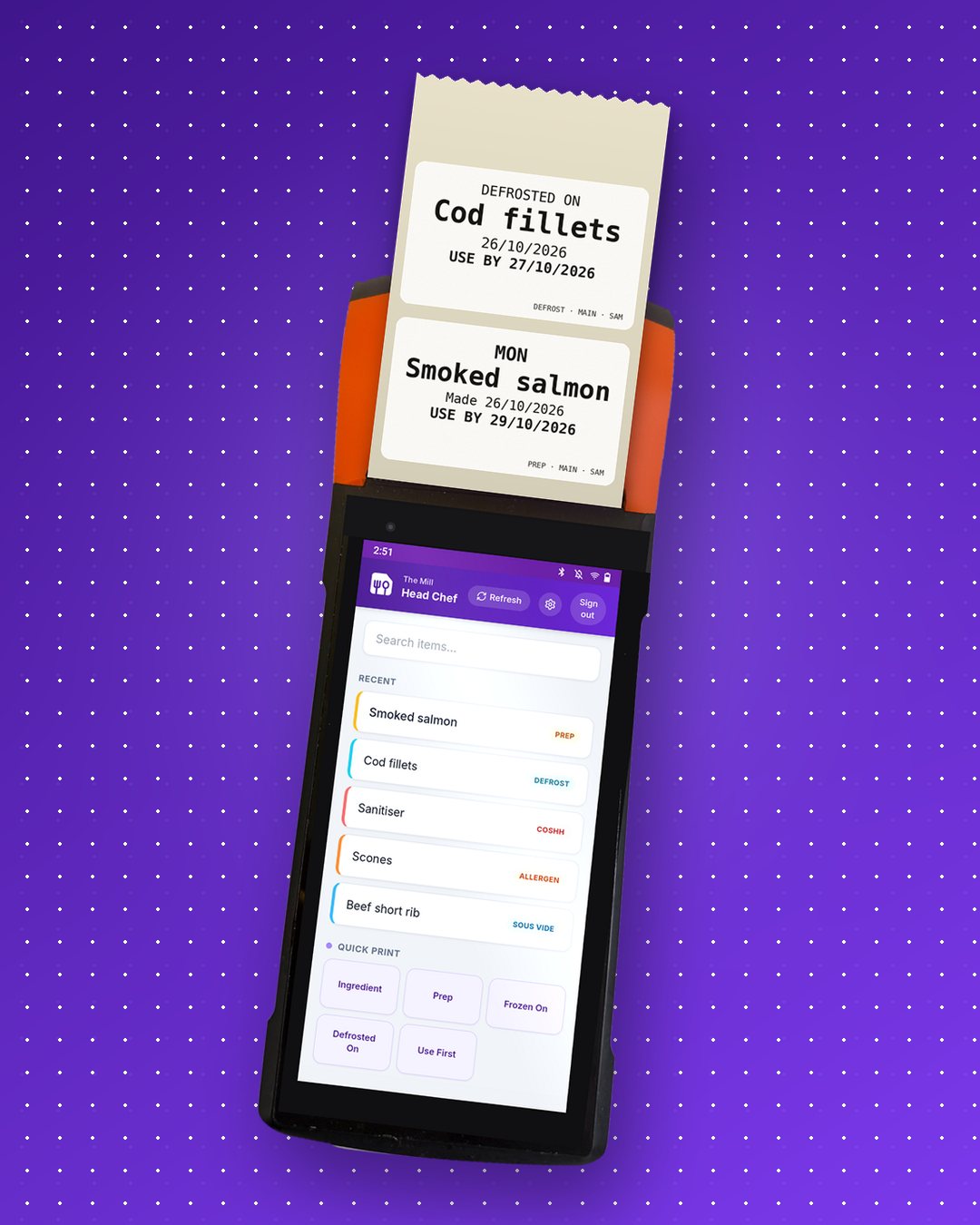
The Food Label System is our automated date labelling product. It prints date labels and barcodes from a stored product list, with the correct dates and allergen information applied automatically.
!The Food Label System handheld printer printing date labels for cod fillets and smoked salmon
It also connects with the rest of the Kitchen OS platform, so label records sit alongside your temperature logs and allergen information in one place. For more on the surrounding controls, see our Allergen Management Guide and HACCP Compliance Guide.
A simple way to start
You do not have to change everything at once. A sensible first step is to pick the ten items you label most often, write down the correct shelf life and allergens for each, and check that every one of them currently gets labelled the same way by every team member. That exercise alone usually shows where the gaps are, whether or not you buy anything.
If you would like to see how automated labelling would work in your kitchen, get in touch or have a look at the Food Label System.